Integrations · Claude
Use your Procesario analyses in Claude.
A read-only connector lets Claude answer questions about the process analyses you can already open in Procesario, and build ready-made dashboards from them.
What the connector does
Four things to know first.
Read-only
Claude can list analyses, describe their data and run aggregate queries. Nothing in the connector can change data.
Your access, nothing more
Each person connects with their own Procesario account and sees only the analyses they can already open in Procesario.
Identifiers stay coded
Case ids, event ids, resource names and attribute values reach Claude as stable codes. Activity names, paths and finding titles stay readable.
Logged and revocable
Every call Claude makes is written to the workspace audit log. A connection can be ended at any time under Connected apps.
Set up
Connect once, then each person signs in.
For workspace administrators
- 01
In Procesario, open the workspace's Connected apps page and turn on External data tools. Until a workspace owner or administrator does this, Claude cannot read the workspace.
- 02
Copy the connector address shown in the Connect Claude block on that page. It ends in /api/mcp.
- 03
In Claude, open Settings, then Connectors, and choose Add custom connector. Paste the address and save. Leave the OAuth client id and secret empty: Procesario registers Claude automatically.
- 04
On a Claude Team or Enterprise plan, an organisation owner adds the connector once and members then see it. On an individual plan, each person adds it for themselves.
- 05
Decide before you turn the setting on: data that Claude reads passes to Anthropic under your own Claude agreement.
For members
- 01
In Claude, open Connectors, choose Procesario and select Connect.
- 02
Sign in to Procesario if asked, choose the workspace this connection may read, and approve. A connection reads exactly one workspace.
- 03
Ask Claude, for example: "List my Procesario analyses", then "Where do parcels wait longest?"
- 04
To end the connection, remove it under Connected apps in Procesario. Claude's next call then fails.
What Claude can call
Five read-only tools.
Results describe your process data. Values such as activity names are treated as data, never as instructions. Large results are cut to a fixed size and say so.
list_analyses
The data pools, published log versions, perspectives and analyses you can open.
describe_dataset
The tables and columns of one analysis, with units, and which columns are coded.
query_table
Filtered, grouped and aggregated queries: counts, sums, averages, medians and 90th percentiles, by day, week or month.
get_process_metrics
The engine's process measures, transitions and bottleneck candidates.
get_findings
The engine's findings, ranked, with how many cases each affects.
Ready-made dashboards
Six dashboards, the same for everyone.
The procesario-dashboards skill tells Claude exactly which queries to run, which charts to draw and what to write beside each chart.
- 01
Download the skill file below. It is plain text instructions with no scripts; review it before you install it, as you would any skill.
- 02
In Claude, open Customize, then Skills, and upload the file. On Team and Enterprise plans an owner can provision it for the whole organisation; otherwise each person uploads it.
- 03
With the Procesario connector switched on in the conversation, ask for a dashboard by name and analysis label (examples below). Claude follows a fixed template, so everyone gets the same views.
- A dashboard runs its queries again each time it is opened, with the viewer's own Procesario access. Someone without access to the workspace sees empty charts.
- It uses the newest finished analysis of the same data pool and perspective, so it moves to a new log version once that version has been analysed. Ask for a specific log version to pin it.
- Identifiers in a dashboard are codes. A Procesario user can look a case up in Procesario itself.
| Dashboard | What it shows | Ask Claude |
|---|---|---|
| Process overview | Cases and their duration, the busiest steps, cases per month, the most common paths and a findings count. | “Create the Procesario process overview dashboard for <analysis>.” |
| Bottlenecks and waiting time | Where cases wait before a step, the slowest hand-offs and the bottlenecks the engine flagged. | “Create the Procesario bottleneck dashboard for <analysis>.” |
| Variants | How many paths cases follow, how much the common paths cover and how long each path takes. | “Create the Procesario variants dashboard for <analysis>.” |
| Conformance and findings | What the engine flagged, by kind, severity and step, with the strongest findings. | “Create the Procesario conformance dashboard for <analysis>.” |
| Monthly trend | Cases started against finished, duration by start month and activity per month. | “Create the Procesario monthly trend dashboard for <analysis> from 2026-01-01 to 2026-07-01.” |
| Executive one-pager | One screen for managers: the headline numbers, where time goes, common paths, top findings and the recent trend. | “Create the Procesario executive one-pager for <analysis>.” |
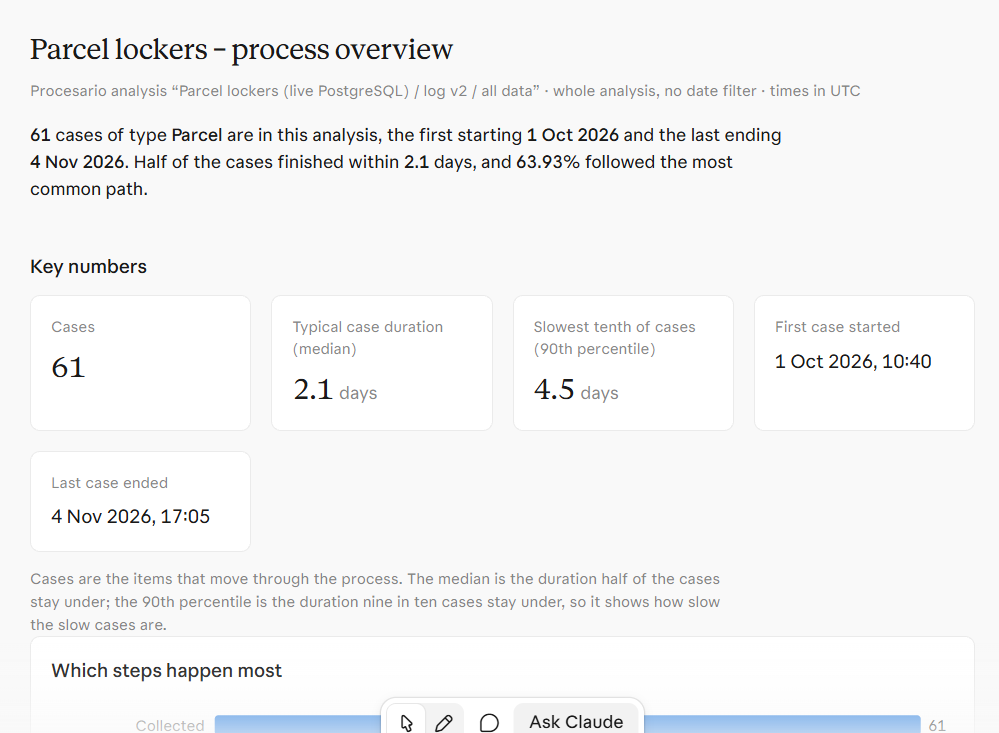
Sample data Process overview: key numbers for a parcel-locker log.
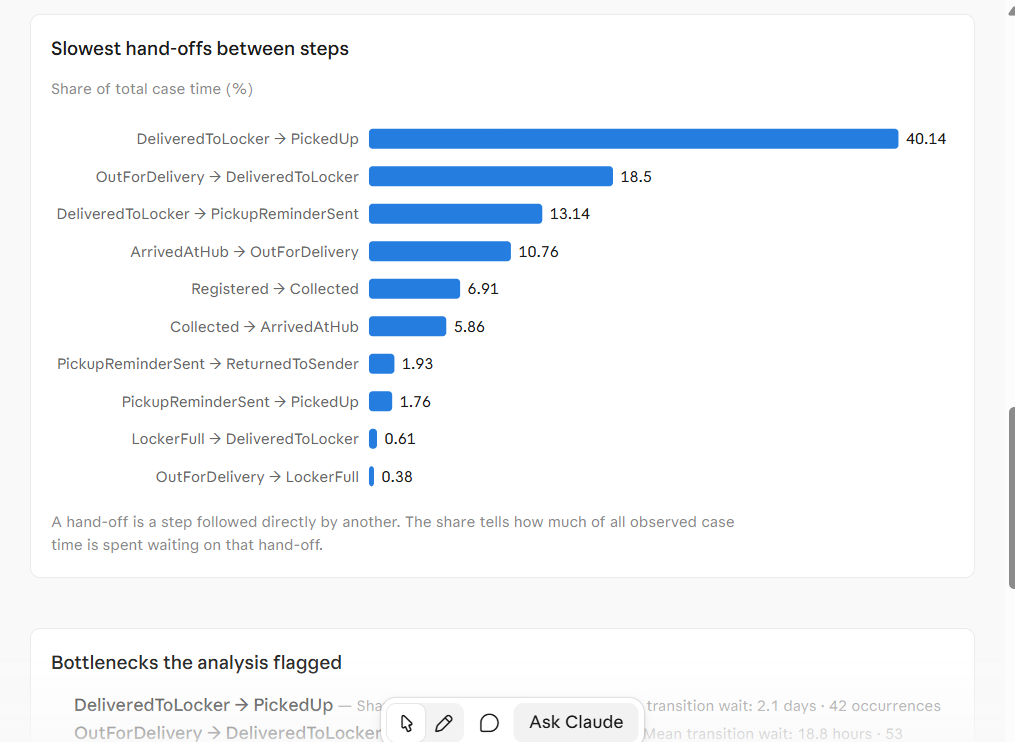
Sample data Bottlenecks: the slowest hand-offs between steps, by share of case time.
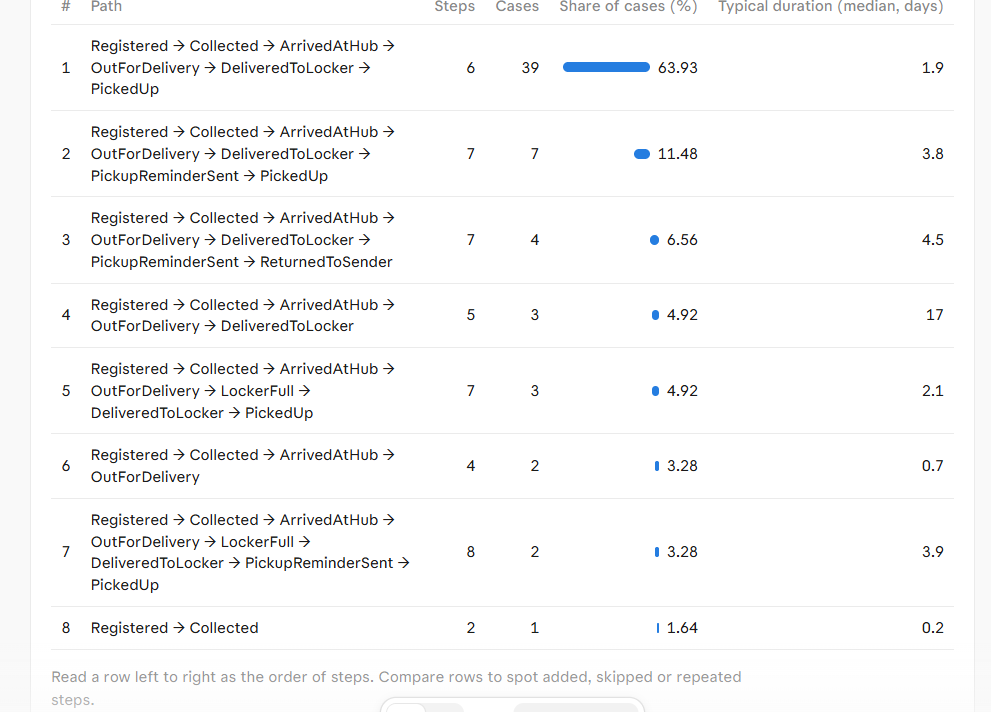
Sample data Variants: every path in words, with cases, share and typical duration.
Troubleshooting
If something does not work.
- Claude says Procesario refused its request right after you signed in
- Something in front of the server is blocking Claude's servers, often a firewall or bot protection that blocks AI user agents. Allow requests with the Claude-User user agent to /api/mcp.
- Claude lists no analyses
- Check that External data tools is on for the workspace, that you connected the right workspace, and that your Procesario account can open the analyses.
- "Some sources failed to load" on a dashboard
- Several charts asked at the same moment and one was refused for a few seconds; the dashboard retries on its own. Close duplicate tabs of the same dashboard if it keeps happening.
- A dashboard shows a notice that the analysis is older than the latest log
- A newer log version was published but not analysed yet. Run the analysis in Procesario and open the dashboard again.
Claude is a product of Anthropic. It is named here only to describe this integration; this does not imply a partnership, certification or endorsement.
Questions about connecting Claude?
Tell us how your team wants to use Procesario analyses in Claude, and we will help you set it up.